Build Your Own Bash-Powered AI Agent in Under an Hour
How to turn natural language into terminal superpowers — without becoming a sysadmin wizard.
Learn how to build a Bash-powered AI agent using NVIDIA Nemotron Nano v2. Step-by-step guide to creating an intelligent terminal automation assistant with Python, LangGraph, and safe command execution.
If you could talk to your computer like a coworker — and have it actually do things in your terminal — what would you build?
In this guide, you’ll learn how to create a fully functional Bash AI agent powered by
NVIDIA Nemotron Nano v2, a lightweight yet reasoning-strong large language model ideal for agentic workflows.
Whether you’re a developer, sysadmin, or automation lover, this tutorial shows you how to build a natural-language Bash assistant in under an hour.
Why This Bash AI Agent Matters
AI agents are rapidly moving beyond chatbots. Instead of merely responding with text, modern agents:
- Understand high-level goals
- Plan multi-step actions
- Execute safe commands
- React to command results
- Continue until the task is done
A Bash agent is one of the most practical real-world examples because the command line:
- Exists on nearly every operating system
- Offers access to core system functions
- Supports automation and scripting
- Enables powerful workflows with minimal tooling
This makes the Bash terminal the perfect playground for intelligent agents.
The Engine: NVIDIA Nemotron Nano v2
Nemotron Nano v2 is designed for fast, efficient reasoning on local hardware.
It excels in:
- Tool calling
- Step-by-step planning
- Interpreting system feedback
- Running at low latency on consumer GPUs
This makes it ideal for agentic applications where the model must continuously reason about state changes and tool outputs.
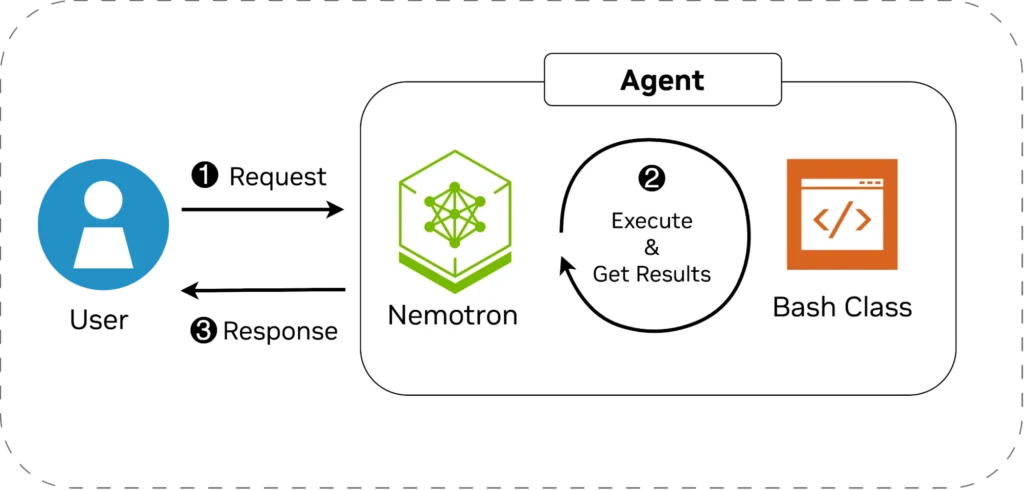
The Architecture: Safe Terminal Automation
Your Bash AI agent is built on two simple components:
1. A Safe Bash Wrapper
This Python class:
- Limits execution to an allowlist of safe commands
- Tracks the current working directory
- Requests human confirmation before each execution
- Returns structured JSON containing
stdout,stderr, and updatedcwd
This ensures a safe, predictable, auditable environment.
2. The AI Agent
The agent:
- Reads user intent
- Breaks instructions into Bash steps
- Calls the Bash tool as needed
- Adjusts based on terminal output
- Summarizes and reports results
A structured system prompt enforces boundaries and reinforces safe behavior.
Example Interaction (Real Output)
Here’s what using the agent feels like:
🙂 Make a folder "system-info", create info.txt, gather disk/memory stats, and summarize them.

▶️ Execute 'mkdir system-info'? [y/N]: y
▶️ Execute 'touch system-info/info.txt'? [y/N]: y
▶️ Execute 'df -h >> system-info/info.txt'? [y/N]: y
▶️ Execute 'free -h >> system-info/info.txt'? [y/N]: y
▶️ Execute 'cat system-info/info.txt'? [y/N]: y
🤖 Summary Presented to User
- Disk space
- Available memory
- Swap usage
- Volume details
All without writing a single command.
Optional: Supercharge It with LangGraph
If you want more structure, resilience, and automatic multi-step execution,
LangGraph offers:
- Built-in agent loops
- Better error handling
- Conversation state management
- Automatic tool invocation
It turns your Bash agent into a production-ready component.
What You Can Build Next
Once you have this foundation, you can expand your Bash AI agent into:
- Developer assistants
- Code scaffolding tools
- DevOps automation
- Multi-agent orchestration
- Command-line copilots
- Personal productivity tools
This small project demonstrates the same principles powering the next generation of agentic systems.
Final Thoughts
You just learned how to build a fully functional Bash AI agent, complete with:
- Natural-language understanding
- Safe command execution
- Real-time reasoning
- Practical tooling
- Optional LangGraph integration
As agentic AI becomes mainstream, tools like Nemotron Nano v2 will power countless new workflows — from everyday automation to advanced multi-agent systems.
>> Find the full agent code on Github